01 / START
Pick a job. Start.
Open MinuteMill on a phone and tap a job card. Time starts recording, and work carries on.
MinuteMill is a browser-based job time tracker for manufacturing teams and job-based crews. Your team taps to start, stop, or switch jobs on their phones. See labor hours and optional costs by job and employee. No paper timesheets or retyping hours later.
Works in your phone's browser. Nothing to download or install.
One manager + one employee free. No credit card.
Additional active employees: USD 4.99 / month
Your company controls employee access. Your job records stay out of website analytics. How we handle data.
Inside MinuteMill
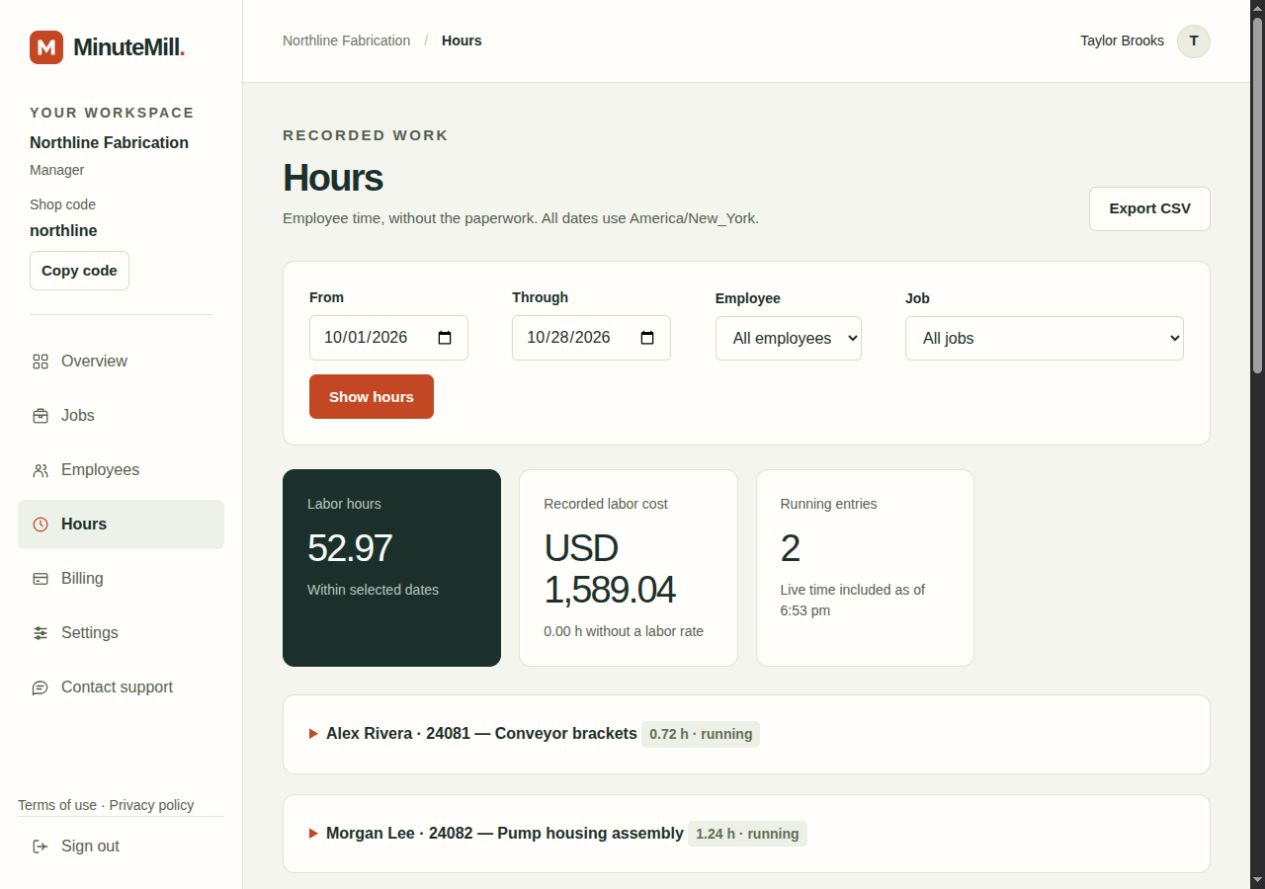
See the actual employee job board and manager's Hours report. These screenshots use fictional demo data.

Open MinuteMill in a browser on a phone, tablet, or computer. Sign in and get to work. No app-store download or installation needed.
Open MinuteMill on a phone and tap a job card. Time starts recording, and work carries on.
The hours are recorded against the employee and the job. No timesheet to fill in at the end of the day.
Tap a different job to switch. The old timer stops and the new one starts. Nothing else to remember.
Start and stop times are saved on our server. Lock your phone or close the page; your current job keeps running. Open it again to pick up the same job and see the elapsed time.
Switching jobs stops the old timer and starts the new one together. If an entry needs correcting, your manager can fix it with a clear record of the change.
An internet connection is needed to start, stop, or switch jobs.
Your shop, at a glance.
Illustrative job report · Your hours, without the paper trail.
See who's working on what and how the hours add up. End the day knowing which jobs used the time, with recorded hours to review instead of a stack of paper.
Compare the labor you allowed for with the hours and optional labor costs actually recorded. Use that history when planning the next quote. Your business still decides overhead, pricing, and margin.
This is job labor tracking. Payroll, taxes, and machine runtime stay in the systems you already use.
Get your shop startedOn the floor or at the next job
The same start, stop, and switch routine fits construction work, cleaning services, and automotive job shops.
Use job names or cost codes for the work a crew moves between, such as framing and finish work.
Put each site or work order on the job board and record time as the team moves to the next clean.
Use repair tickets or job numbers so labor hours stay with the vehicle or job being worked on.
See time tracking for job-based trades. If you need location verification, payroll, or dispatch, keep those tools alongside MinuteMill.
One manager and one employee are free. Get a feel for MinuteMill, then add the people who do the work.
Each additional active employee is USD 4.99 per month. Your manager account and first employee stay free.
USD 44.91 / month
For a team of 10 active employees: one employee is included free. The other nine are billed at USD 4.99 each per month. Your manager account is free, too.
Cancel any time from Billing. Cancellation stops the next renewal; your current paid period continues until it ends.
One manager + one employee included.
If MinuteMill does not fit, request a refund of your first paid month within 30 days of your first charge. First-month refund details.
A clear place to start
Take a look at the workflow, get your team set up, or explore a simpler way to record employee hours by job.
See an employee start, switch, and stop a job, then see how their time becomes a manager's labor report.
How it worksA practical guide to adding jobs, inviting employees, using shop codes, and reviewing the first day's hours.
Getting startedTrack employee hours against the jobs they are doing, without entering the same numbers again later.
Track hours by jobThe reason behind it

MinuteMill started with a manufacturing owner who was tired of collecting paper timesheets, entering the hours later, and never being confident in labor costs. His team needed something simple they could use right where they worked. So, I built it.
My background includes 12 years in industrial packaging, with work in engineering and management before running my own job shop and development agency. I built MinuteMill around the typical everyday routine: start, stop, switch, and see where the hours went.
Joe MessengerFounder, Syllable Agency · LinkedIn profile
Read the product updates or contact MinuteMill. You can export your hours as CSV, and cancellation does not delete your recorded work.
Before you get started
How it fits into the working day.
No. Managers create an invitation and share the setup link. Employees choose a password and sign in with their shop code and username. An email address is optional.
No. MinuteMill works in a browser on a phone, tablet, or computer. Open the website, sign in, and choose a job.
The current timer keeps running. Open MinuteMill again to see the same job and its elapsed time. Closing the page does not stop the job; tap Stop when you finish or take a break.
Yes, to start, stop, switch jobs, or save a note. If the connection drops, the current timer keeps running. Reconnect and check that your stop or switch has been saved before moving on.
A manager can correct the entry and leave a reason. The original times are retained with the correction. Employees can add notes to explain what happened, but cannot edit their recorded times.
A simple screen helps, but the team still needs a routine. Start with one employee and a few real jobs. Practice starting, switching, and stopping for breaks, then review the first day together. Employees use their phones at the work, so there is no walk to a shared kiosk. Use the daily recap to spot missed stops and discuss corrections.
MinuteMill is provided and operated by Syllable Agency LLC, led by Joe Messenger. Managers can contact MinuteMill support from the menu or email track@minutemill.com. You can export recorded hours as CSV, and canceling a subscription does not delete your jobs or recorded hours. Keep exports of the records your business needs. We do not promise uninterrupted availability; our Terms explain service changes and closure.
See the getting started guide for the full routine, or ask us a question.
Give your shop a simpler way to track job time.